

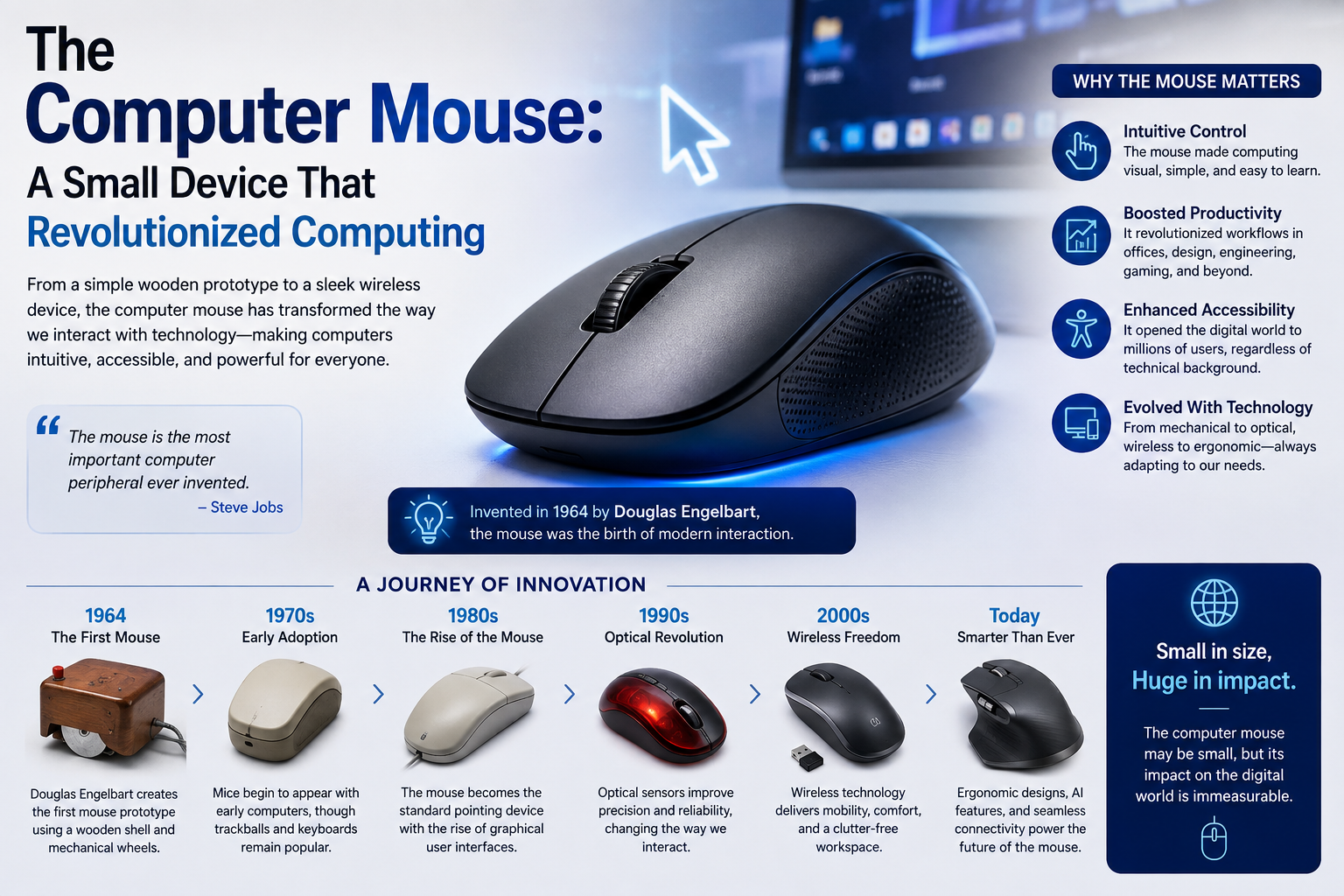
Introduction Mouse
In the vast ecosystem of computer peripherals, few devices have had as profound an impact on how we interact with technology as the computer mouse. This small, handheld device, often taken for granted, transformed computing from a text-based endeavor reserved for specialists into a visual, intuitive experience accessible to everyone. Today, billions of people around the world use a mouse daily, whether for work, gaming, creative pursuits, or casual browsing. Understanding the history, mechanics, and evolution of this humble device reveals just how significant its role has been in shaping the digital age.
The Origins of the Mouse
The computer mouse was invented by Douglas Engelbart in the early 1960s at the Stanford Research Institute in California. Engelbart, a visionary engineer, was searching for ways to make human-computer interaction more efficient and natural. In 1964, he and his colleague Bill English developed the first prototype—a simple wooden shell containing two perpendicular wheels that could track movement across a surface. Because of the cord trailing behind it, which resembled a tail, the device was nicknamed the “mouse,” and the name stuck permanently.
Engelbart publicly demonstrated the mouse in 1968 during what is now famously known as “The Mother of All Demos.” This presentation showcased not only the mouse but also hypertext, video conferencing, and collaborative editing—concepts that were decades ahead of their time. Despite this groundbreaking debut, the mouses remained largely confined to research laboratories for over a decade.
The device entered the commercial mainstream in the early 1980s. Xerox’s Star workstation, released in 1981, was among the first commercial systems to feature a mouse. However, it was Apple’s Lisa (1983) and, more significantly, the Macintosh (1984) that brought the mouse into homes and offices worldwide. Microsoft soon followed, and the mouse became an indispensable companion to the graphical user interface (GUI).
How Does a Mouse Work?
The fundamental purpose of a mouse is to translate physical hand movements into cursor movements on a screen. Over the decades, the technology behind this translation has evolved considerably.
Mechanical mice, the earliest widespread type, used a rubber ball housed inside the device. As the mouses moved, the ball rolled, turning two internal rollers positioned at right angles. Sensors detected the rotation of these rollers and converted it into directional data. While functional, mechanical mice accumulated dust and debris, requiring regular cleaning.
Optical mice, which became dominant in the early 2000s, eliminated the ball entirely. Instead, they use a light-emitting diode (LED) and a small camera that takes thousands of pictures per second of the surface beneath the mo use. A digital signal processor analyzes these images to determine the direction and speed of movement. This design is far more reliable, precise, and maintenance-free.
Laser mice operate on a similar principle but use an infrared laser instead of an LED. The laser provides greater sensitivity and allows the mouse to function on a wider variety of surfaces, including glossy or reflective ones.
Types of Computer Mice
Modern mice come in numerous varieties, each designed for specific needs and preferences.
Wired mice connect directly to a computer via USB, offering reliable, lag-free performance without the need for batteries. They remain popular among gamers and professionals who prioritize responsiveness.
Wireless mice communicate through radio frequency (typically via a USB dongle) or Bluetooth. They provide freedom of movement and reduce desk clutter, making them ideal for travel and minimalist setups. Modern wireless technology has virtually eliminated the latency issues that once plagued these devices.
Trackball mice feature a stationary ball manipulated by the thumb or fingers while the device itself remains fixed. These are favored by users with limited desk space or those who experience wrist strain from traditional mice.
Ergonomic mice are shaped to support a natural hand position, reducing the risk of repetitive strain injuries such as carpal tunnel syndrome. Vertical mice, for instance, position the hand in a handshake-like orientation.
Gaming mice offer high-precision sensors, adjustable DPI (dots per inch) settings, programmable buttons, and customizable weights. DPI measures sensitivity—higher values mean the cursor travels farther with less physical movement. Competitive gamers often fine-tune these settings for optimal performance.
Beyond Pointing and Clicking
While the core function of the mouses has remained constant, its capabilities have expanded dramatically. Early mice had a single button; today’s models commonly feature two buttons, a clickable scroll wheel, and additional side buttons. The scroll wheel, popularized in the mid-1990s, revolutionized document navigation and web browsing. Many modern mice also include gesture support, horizontal scrolling, and software that allows users to assign custom functions to buttons, streamlining workflows for everything from video editing to spreadsheet management.
The Mouse’s Impact on Computing
The significance of the mouse extends far beyond its technical specifications. By enabling intuitive point-and-click interaction, it made the graphical user interface practical and popular. This shift democratized computing, allowing people without programming knowledge to operate computers effectively. Tasks that once required memorized commands became as simple as clicking an icon. In this sense, the mouse was not merely an accessory but a catalyst for the personal computing revolution, bridging the gap between humans and machines.
The Future of the Mouse
Despite the rise of touchscreens, trackpads, and voice control, the mouse remains remarkably resilient. Precision tasks—graphic design, gaming, detailed editing—still favor the accuracy a mouse provides. Innovations continue to emerge, including mice with adaptive sensors, haptic feedback, and enhanced ergonomic designs. Rather than disappearing, the mo use seems destined to evolve alongside new interfaces.
Conclusion
From a wooden box with wheels to a sophisticated optical instrument, the computer mo use has journeyed through more than six decades of innovation. It transformed computing from an arcane skill into an everyday activity and continues to serve as an essential tool for millions. As long as precision and comfort matter in human-computer interaction, the mouse will remain a quiet but mighty fixture of our digital lives.
 Anita
Anita